- Python 89.3%
- Shell 6.7%
- Meson 3.3%
- Makefile 0.7%
| Filename | Latest commit message | Latest commit date |
|---|---|---|
|
|
||
| .github | ||
| debian | ||
| doc | ||
| etc | ||
| staslib | ||
| subprojects | ||
| test | ||
| usr/lib/systemd/system | ||
| utils | ||
| .coveragerc.in | ||
| .gitignore | ||
| .readthedocs.yaml | ||
| ADDENDUM.md | ||
| CLAUDE.md | ||
| CONTAINERS.md | ||
| CONTRIBUTING.md | ||
| coverage.sh.in | ||
| DISTROS.md | ||
| LICENSE | ||
| Makefile | ||
| meson.build | ||
| meson_options.txt | ||
| NEWS.md | ||
| NVME-STAS-CLI_COMPARISON.md | ||
| nvme-stas.spec.in | ||
| pyproject.toml | ||
| README.md | ||
| stacctl.py | ||
| stacd.py | ||
| stafctl.py | ||
| stafd.py | ||
| TESTING.md | ||

nvme-stas - NVMe STorage Appliance Services (STAS)









What nvme-stas Provides
nvme-stas implements services that support NVMe-over-Fabrics (NVMe-oF) access by a Linux host. Specifically, it provides:
- A Centralized Discovery Controller (CDC) client for Linux (Ref. TP8010)
- Fabric Zoning-aware automated connection management for NVMe subsystems (Ref. TP8010)
- Support for both automatic (zeroconf, Ref. TP8009) and manual configuration
- Asynchronous Event Notifications (AEN) handling
- Error handling and reporting
Why nvme-stas Instead of nvme-cli?
nvme-stas was designed specifically to support the NVMe-oF Technical Proposals TP8009 (Automated Discovery of NVMe-oF Discovery Controllers for IP Networks) and TP8010 (NVMe-oF Centralized Discovery Controller), which cannot be implemented in nvme-cli / libnvme.
The fundamental reason is that nvme-cli is stateless: it issues one-off commands and exits. TP8009 requires persistent mDNS monitoring to detect Discovery Controllers as they appear and disappear on the network. TP8010 additionally requires a host to maintain state — registering with a Centralized Discovery Controller (CDC), tracking Asynchronous Event Notifications (AENs), reacting to Fabric Zoning changes with automatic connect and disconnect operations, and retrying failed connections. These are inherently long-running, event-driven behaviors that a stateless CLI tool cannot provide.
nvme-stas fills that gap by implementing two cooperating systemd daemons (stafd and stacd) that continuously monitor the NVMe-oF fabric and manage controller connections on behalf of the host. For a detailed feature-by-feature comparison, see NVME-STAS-CLI_COMPARISON.md.
High-Level Overview
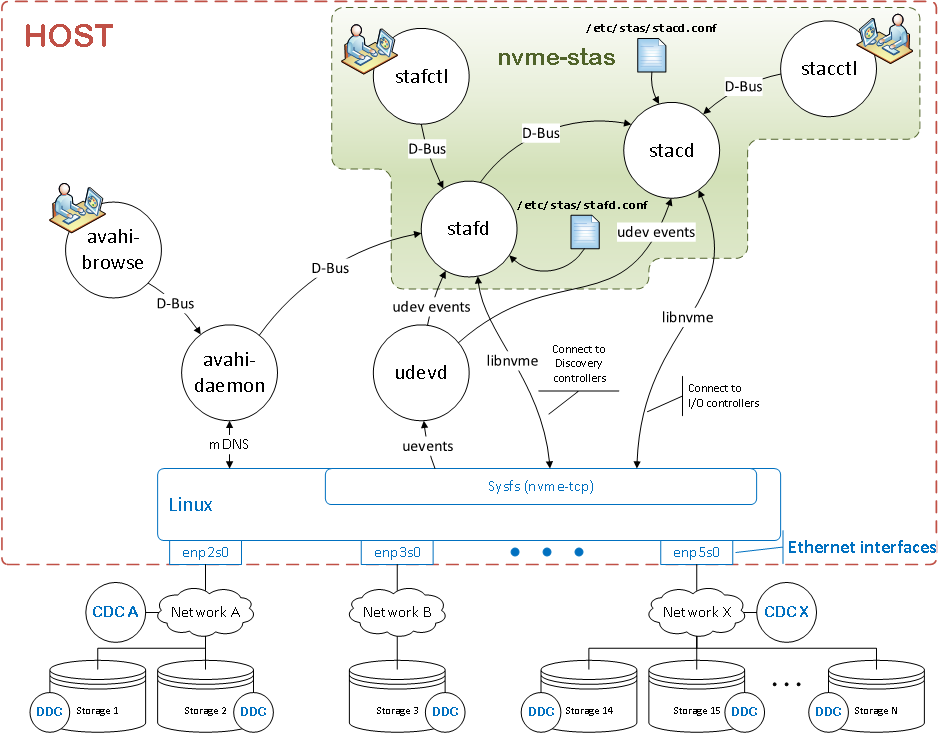
nvme-stas is composed of two cooperating services:
stafd - STorage Appliance Finder Daemon.
stafd is responsible for discovering storage appliances and discovery controllers:
- Registers with the Avahi daemon for
_nvme-disc._tcpmDNS service announcements, enabling zero-configuration networking (zeroconf). - Supports manual discovery configurations as an alternative to mDNS.
- Connects to discovered or configured Centralized or Direct Discovery Controllers (CDC/DDC).
- Retrieves discovery log pages from controllers.
- Caches discovery log pages retrieved from controllers.
- Exposes a D-Bus API for querying discovery status and metadata.
stacd - STorage Appliance Connector Daemon.
stacd handles connections to NVMe storage subsystems:
- Reads subsystem lists from stafd via D-Bus.
- Also supports manually configured subsystem lists.
- Establishes NVMe-oF I/O controller connections.
- Provides a D-Bus API for client tools to inspect I/O controller state.
Neither daemon disconnects a connection it did not make. libnvme's ownership registry records who established each NVMe-oF connection, and nvme-stas consults it before adopting one, so connections belonging to nvme-cli, nvme-discoverd or the initramfs (NBFT) are left alone.
Design Notes
Both stafd and stacd are implemented in Python and are driven using the GLib main loop for event-driven behavior.
GLib, along with libraries like dasbus and pyudev, provides core building blocks such as timers, DNS name resolution, and signal handling integration.
stafd leverages the avahi-daemon to detect Centralized Discovery Controllers (CDC) and Direct Discovery Controllers (DDC). It then uses libnvme to interface with the kernel NVMe stack and establish persistent connections to controllers.
Service Management
Each service is managed via systemd. Common operations:
systemctl start stafd     # Start stafd
systemctl stop stafd      # Stop stafd
systemctl restart stafd   # Restart
systemctl reload stafd    # Reload config without restarting
Equivalent service units exist for stacd. Signals like SIGTERM and SIGHUP are used for orderly shutdowns and configuration reloads respectively.
Deployment note:
stafdandstacdare systemd services designed to run directly on the host. Running them inside containers (Docker, Podman, etc.) is not a supported deployment model. See CONTAINERS.md for a detailed explanation.
Configuration
Configuration is split between the connectivity configuration, which says which controllers to connect to and with what parameters, and each daemon's own behaviour:
| File | Applies To | Purpose |
|---|---|---|
/etc/nvme/nvme-stas.conf |
stafd + stacd | Controllers to connect to, their connection parameters, and the host identity |
/etc/nvme/stafd.conf |
stafd | Daemon behaviour |
/etc/nvme/stacd.conf |
stacd | Daemon behaviour |
The connectivity configuration is libnvme's INI format, read by libnvme's own parser, so nvme-stas, the nvme-cli tools and nvme-discoverd all understand one format. nvme-stas keeps its own file: a host must be able to run nvme-stas and nvme-discoverd side by side, each connecting its own controllers.
Both services can operate with automatically discovered controllers (via Avahi) or manually specified entries in their respective config files.
System Requirements
Linux kernel 5.14 or later (kernel 5.18+ recommended for full feature support).
Required user-space dependencies include:
- libnvme 3.0+ (Python bindings:
python3-libnvme3) - avahi-daemon 0.7+ — required by
stafdfor mDNS-based Discovery Controller discovery - Python 3 system bindings:
dasbus,pyudev,python3-systemd,python3-gi(package names vary by distro).
Host Identification
nvme-stas requires a Host NQN and Host ID to operate. By default, it reads the following files:
/etc/nvme/hostnqn/etc/nvme/hostid
This ensures consistency with other NVMe tools like nvme-cli and libnvme. Alternative values, and the optional Host symbolic name, can be set in the [Host] section of /etc/nvme/nvme-stas.conf.
Excluding Controllers
Controllers that nvme-stas must not connect to are configured in libnvme's host-wide exclusion list — /etc/nvme/exclusions.conf and /etc/nvme/exclusions.conf.d/ — which is managed with nvme exclusion and is honored by every NVMe-oF tool on the host. stafd and stacd re-read it on every connection attempt, so changes take effect without reloading either daemon.
D-Bus Security and Trust
Both stafd and stacd communicate over the system D-Bus bus. D-Bus policy files (installed under /usr/share/dbus-1/system.d/) control which callers are allowed to own or interact with the service names. Only processes running as root (or with explicit D-Bus policy permission) can invoke the service interfaces.
stacd subscribes to D-Bus signals emitted by stafd (log_pages_changed and dc_removed). These signals arrive over the trusted system bus — stacd does not accept instructions from untrusted sources.
stafd caches its discovery log pages in its runtime directory, /run/stafd/, which is protected by root-only filesystem permissions. Do not grant untrusted users write access to that directory. stacd keeps no state file: on startup it asks the kernel what is connected and libnvme's ownership registry who owns each connection.
Build, Install & Tests
This Python project uses Meson as its build system:
meson setup .build
meson compile -C .build
meson install -C .build
meson test -C .build
For users unfamiliar with Meson, an alternate configure && make build is provided that performs equivalent steps.
Companion CLI Utilities
nvme-stas ships basic utilities:
stafctl– interact with stafd.stacctl– interact with stacd.
The host NQN and Host ID are generated by nvme-cli (nvme gen-hostnqn) and uuidgen, which the stas-config@.service units run on first start.
Addendum
For additional troubleshooting and building info, refer to: ADDENDUM.md